Your founder posts on LinkedIn. People engage. And then... nothing happens. This guide shows you exactly how to identify in-market buyers from your engagement data, score them by intent, and activate warm outreach that actually converts.
Most founders and B2B GTM teams have the same experience with LinkedIn: content gets engagement, nothing comes of it.
They post. They get likes and comments. A few ICP buyers engage. And then the signal disappears within 24–48 hours — lost in the notification feed, never followed up on, never routed to sales, never turned into a conversation.
The result: founder-led growth becomes content plus hope. You know the audience is out there. You can feel it in the engagement. But you have no system to capture, score, and convert that attention into pipeline.
💡 The core insight: Without SignalScout: content → engagement → nothing. With signal intelligence: content → signal → ICP-matched engager → warm outreach → pipeline.
Every post creates a micro-ecosystem. 100 people engage. Each of those 100 people has a company, a title, an industry, a company size, and an intent level. In that engagement feed right now, there are likely:
The challenge isn't generating engagement. It's knowing which engagements matter — and acting on them before the signal goes cold.
LinkedIn engagement signals have a short half-life. The window when an outreach message feels relevant and warm — rather than random and cold — is approximately 24–72 hours for Tier 1 signals. After a week, the relevance starts to fade. After two weeks, it's essentially cold outreach.
This means the difference between a 30% reply rate and a 5% reply rate is often just timing and whether you had the system to identify and act on the signal in the first place.
This workflow converts your LinkedIn engagement data into a systematic pipeline engine. Follow it weekly, and founder-led growth becomes predictable.
Scan your founder's or team's LinkedIn profiles to extract who engaged with your content — not just anonymous counts, but individual-level data: name, role, company, seniority, industry, and engagement type (like, comment, share).
With SignalScout: Paste a public LinkedIn profile URL and get the full engagement dataset — all engagers, all posts, enriched with role and company context — in minutes. No manual extraction required.
Raw engagement data includes everyone — your target customers, students, competitors, random accounts, and people who are simply engaging for networking purposes. You need to filter down to actual ICP matches.
Remove non-ICP engagers from your active pipeline list. They can stay on a passive monitoring list, but don't invest outreach effort there.
Once you've filtered for ICP, classify each engager by their signal tier to determine outreach timing and priority:
Priority rule: Tier 1 signals should be acted on before you do anything else. A repeat engager with a comment who matches your ICP is one of the warmest outreach opportunities you'll ever have. Don't let it expire.
The difference between warm and cold outreach is context. Warm outreach references something real — a specific post they engaged with, a topic they commented on, a perspective they shared. This is what makes a 30% reply rate possible versus 3%.
Core principles:
For Tier 1 and Tier 2 signals that have been activated, route to your CRM with signal context tags so sales teams have the full picture for follow-up:
This creates a repeatable, systematic pipeline from content — not just occasional wins from manually noticing an interesting engagement.
These are frameworks, not scripts. The key is referencing the specific signal so the outreach feels relevant rather than random.
Use when: ICP-matched person who has commented on 2+ of your posts. Act within 7 days.
Hi [Name] — I've noticed you engaging with a few of my posts on [topic]. Appreciate the thoughtful comments. Curious — is [the problem you solve] something your team is actively working through right now? Happy to share some of what we've learned if it's useful.
Use when: ICP-matched person who has engaged 2+ times. Act within 14 days.
Hi [Name] — Saw you engaged with a couple of my posts on [topic]. I'm building [product/service] specifically for [their role] at companies like [their company type]. Would love to hear if any of what I shared resonated — or if there's a gap I should be addressing. Worth a 15-minute chat?
Use when: Person left a substantive comment on your post. Reference the comment specifically.
Hi [Name] — Your comment on [post topic] — "[quote their point back]" — was spot on. That's exactly the tension we built [product] to solve. Given your role at [company], I suspect you're feeling this acutely. Would you be open to a quick conversation?
⚡ What to avoid: Don't say "I noticed you liked my post" — it feels surveillance-like. Reference the topic or content, not the mechanical act of liking. "I've been posting about [topic] and noticed you've been engaged with it" is much warmer than "I saw you clicked like on three of my posts."
Founders posting content to build pipeline identify which engagers are ICP buyers, route them to sales, and track which content topics attract the right audience vs. vanity engagement.
VC partners track which founders engage with their content before raising — identifying pre-raise deal flow 3–12 months before formal pitches through repeat engagement signals.
Sales teams use CEO or executive content engagement as warm lead signals — reaching out with context on behalf of the executive to high-signal engagers from their ICP.
Before events, scan speaker and organizer profiles to identify who's already engaged — building a targeted warm outreach list of attendees who've demonstrated interest.
Identify operators, advisors, and ecosystem players who engage with your content — people who could become partners, amplifiers, or warm intro sources into target accounts.
SignalScout captures and scores every engager automatically. The Posts tab shows engagement per post with filters and export options. The Influenced Audience tab gives you the scored, tiered list — ready for outreach activation.
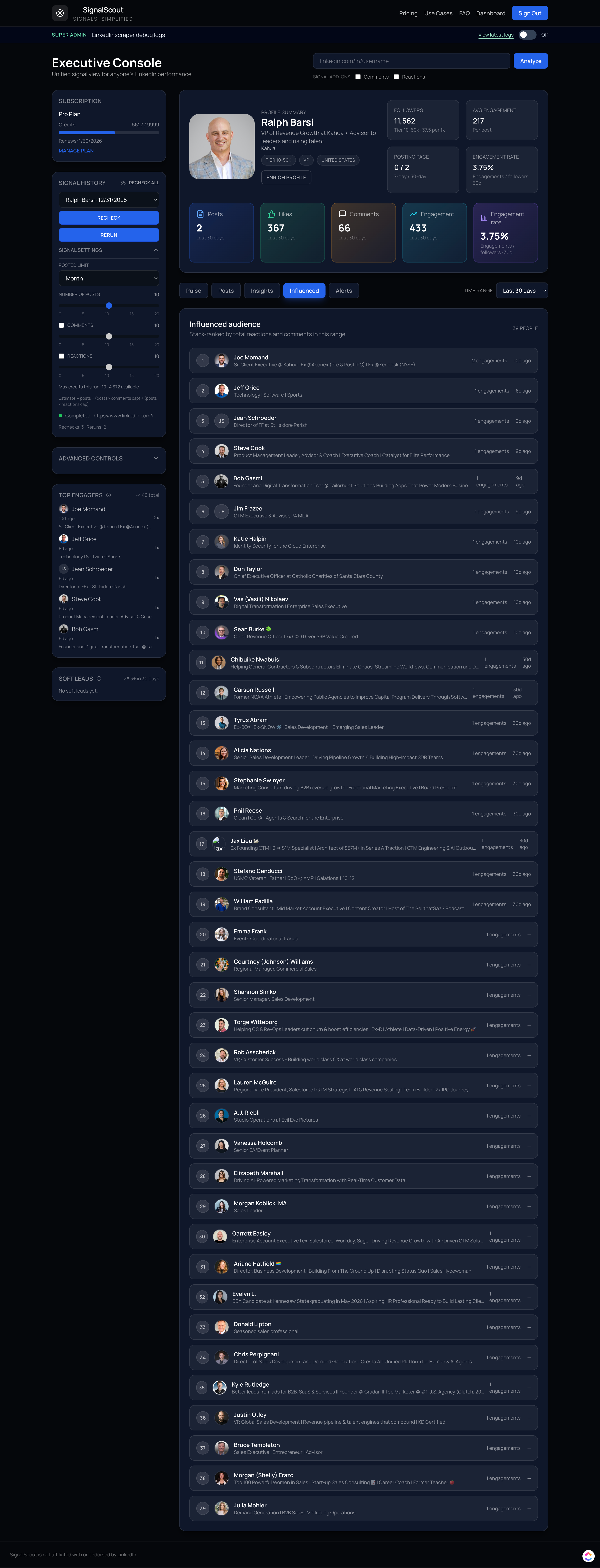
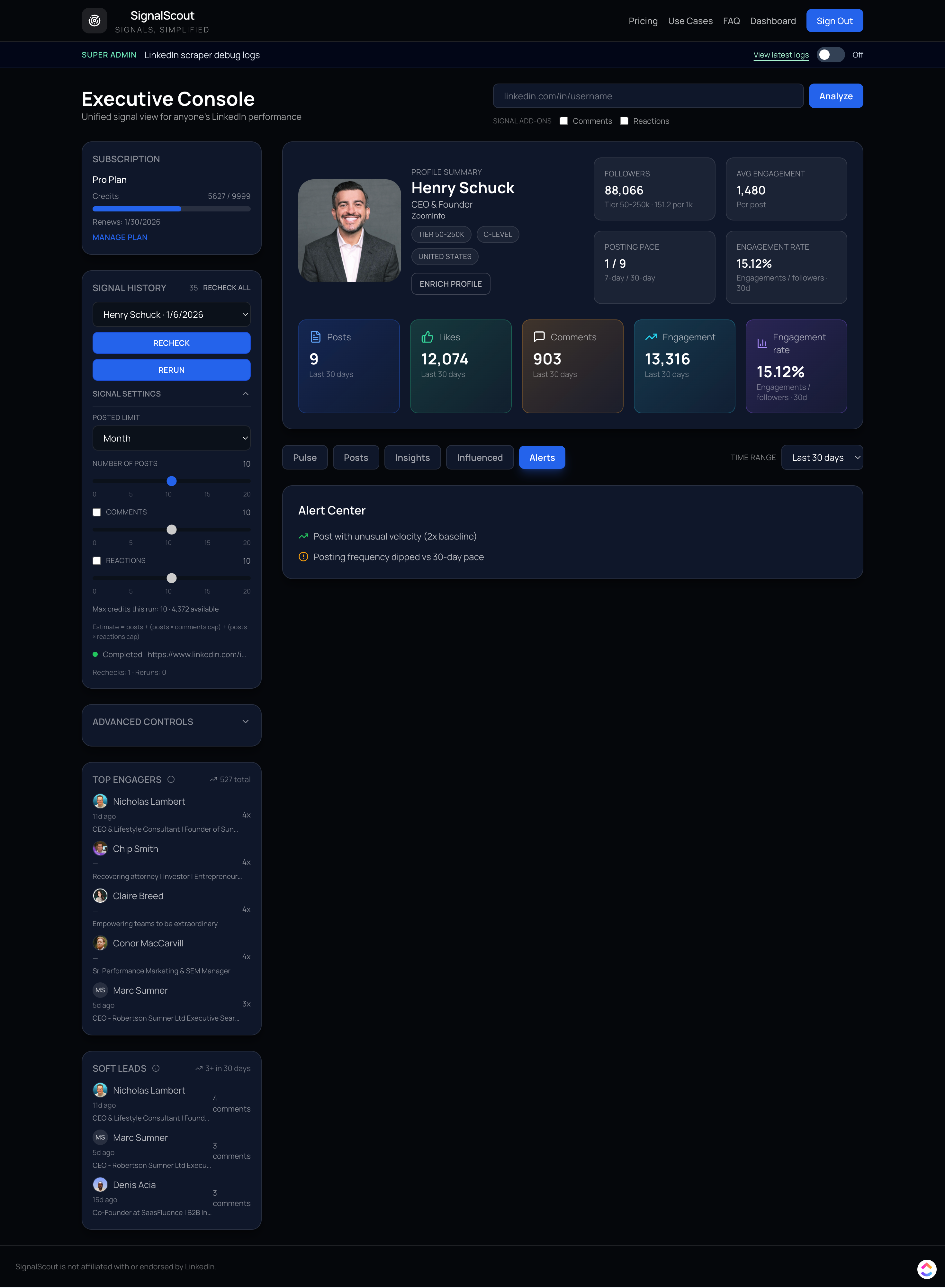
The four-step workflow: First, identify engagers from your founder or team content using a signal intelligence tool — extract name, role, company, and engagement depth. Second, filter for ICP match based on role, company size, and industry. Third, score by signal tier — Tier 1 (repeat commenter with relevant role) gets immediate outreach; Tier 2 gets a warm message within 14 days; Tier 3 is tracked for pattern accumulation. Fourth, activate warm outreach within 24–72 hours of identifying a Tier 1 signal, referencing the specific content they engaged with rather than just noting that they liked something.
Strongest intent signals in order of confidence: (1) Repeat engagement (2+ posts) from someone with a relevant ICP role and company — highest confidence, activate immediately. (2) A substantive comment on a product- or problem-focused post from an ICP role — shows engaged thinking, not passive consumption. (3) Multiple engagements on posts specifically about your product category or the problem you solve. (4) A share of your content — sharing requires conscious effort and signals strong topical alignment. Single likes from ICP roles are weak signals individually but become meaningful when they accumulate across 2+ weeks.
For Tier 1 signals (repeat engager + comment + ICP role), activate within 7 days — ideally 24–72 hours when the signal is freshest and the person is most likely to remember engaging with your content. For Tier 2 signals, activate within 14 days. For Tier 3, wait for pattern accumulation. Cold outreach based on a single like is rarely effective and can feel invasive — wait for at least two signal events before personalizing an outreach message referencing their engagement.
Founder-led growth on LinkedIn is using the founder's personal content as a demand generation channel — publishing content that attracts ICP buyers and converting that engagement into pipeline through signal-based outreach. Without signal intelligence, this process is manual and inconsistent: the founder or an assistant manually checks who engaged, guesses at roles and relevance, and reaches out with spotty follow-through. With signal intelligence, engagement data is automatically converted into scored, ICP-filtered, prioritized prospect lists that feed directly into sales outreach.
LinkedIn Sales Navigator helps you find who exists — filtering by role, company size, and industry to build a targeted prospect list. Signal intelligence identifies who is actively paying attention right now — people who have already demonstrated interest by engaging with your specific content. The difference is temperature: Sales Navigator builds cold lists of people who match your criteria. Signal intelligence surfaces warm relationships that are already in motion, where outreach has a genuine reason to be sent and a much higher probability of reply.