
SignalScout Product Marketing Guide
A single resource that explains the dashboard, tabs, and intelligence modules with product‑ready language and screenshots.
Primary GTM reference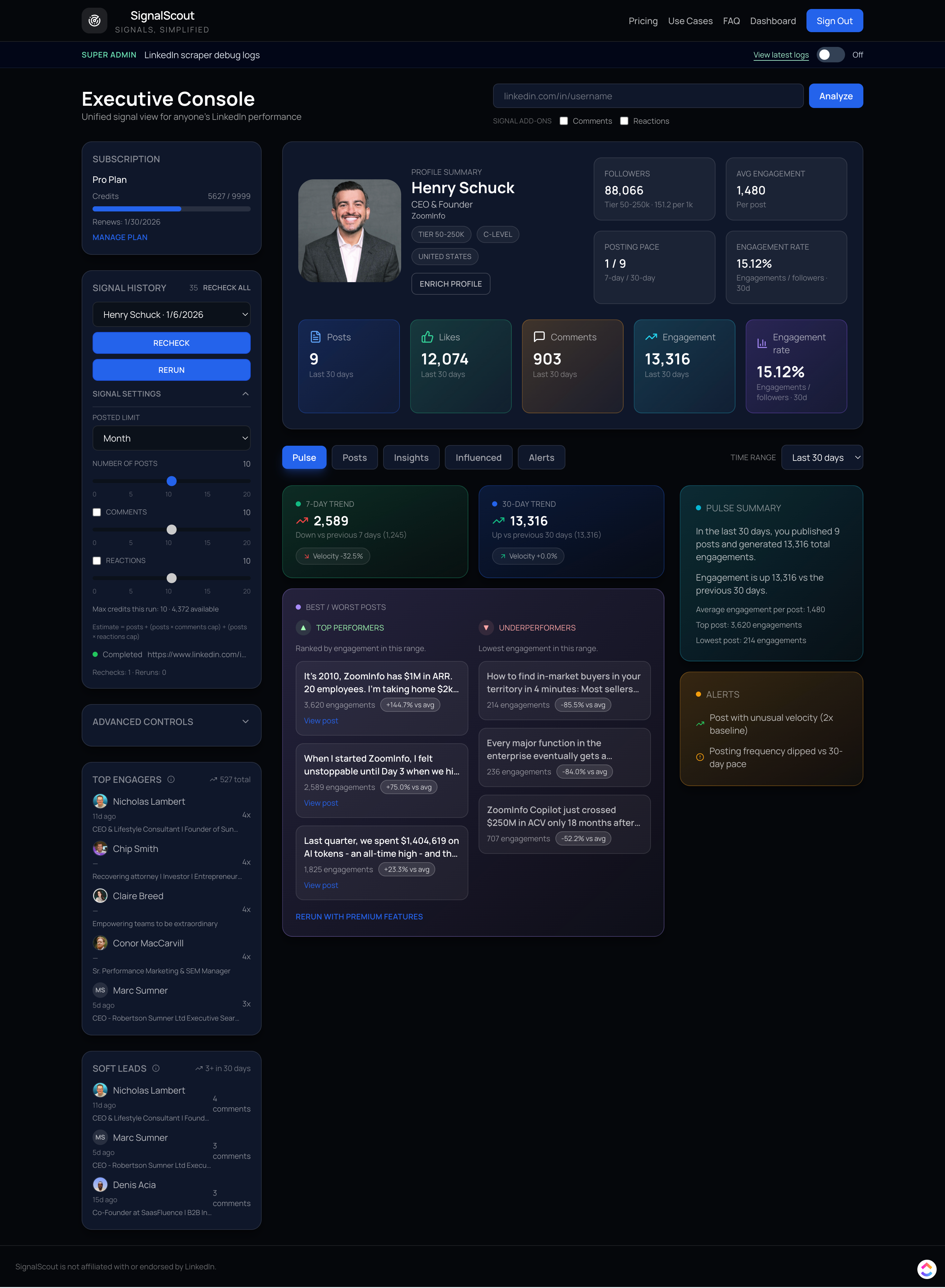
Positioning Summary
Core message: SignalScout turns public profile activity into clear, trustworthy intelligence so teams can make better decisions fast.
Positioning: Social signal intelligence from public activity, no logins, no cookies, no private data.
Audience: Startup founders/CEOs, founding marketers/growth leads, and VC platform teams running founder-led growth (with agency and brand teams as secondary segments).
Public signals. Clear intelligence.
SignalScout Use Cases
Use cases for public signal intelligence. Teams use SignalScout to turn public activity into clear, defensible decisions.
Applied intelligence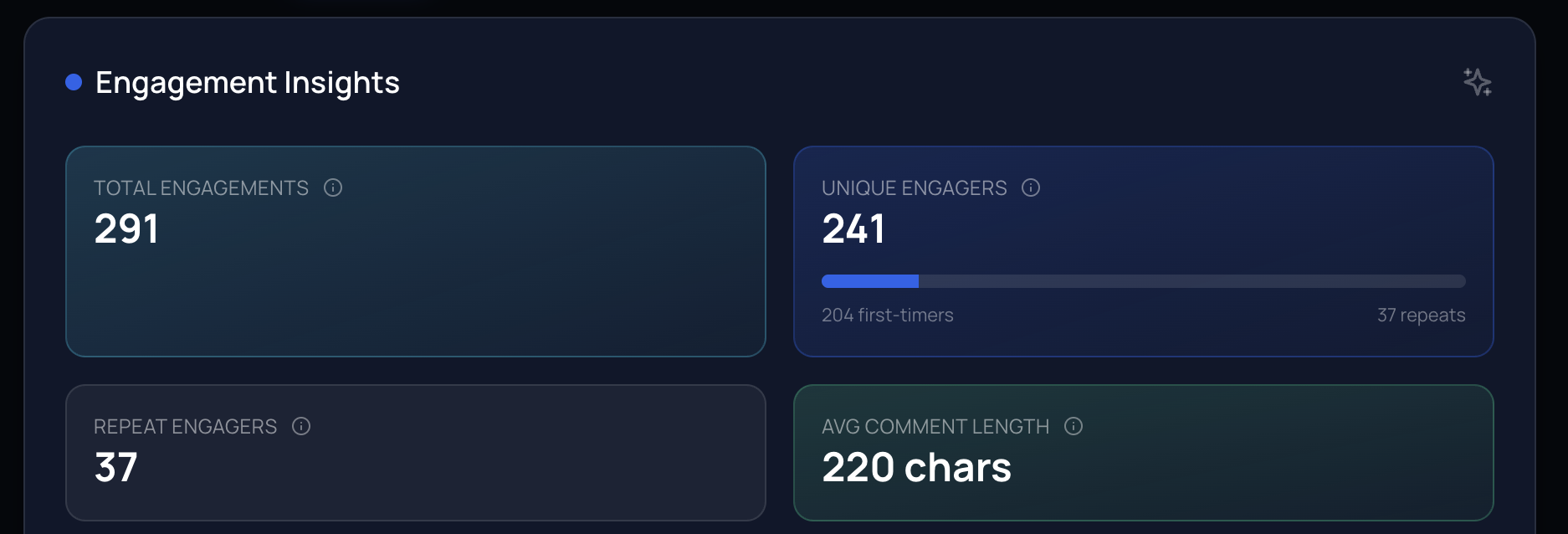
Content Analysis
Analyze what content performs well in your industry or niche.
- Identify high-performing post types.
- Understand engagement patterns.
- Discover trending formats.
- Benchmark against competitors.
Example: A marketing team compares short posts vs long-form and finds that short, corrective posts drive deeper comment threads.
Competitive Intelligence
Monitor competitor content strategies and engagement patterns.
- Track competitor strategies.
- Identify content gaps.
- Monitor engagement trends.
- Benchmark performance metrics.
Example: A growth lead spots a competitor's shift toward corrective content and uses the intent-response map to explain why it is working.
Lead Generation
Identify potential clients through their content interests and engagement.
- Find engaged prospects.
- Identify decision makers.
- Research target accounts.
- Track prospect interests.
Example: A sales team filters repeat engagers and uses the influence nucleus to prioritize outreach.
Content Strategy
Research trending topics and formats in your field.
- Discover trending topics.
- Identify content opportunities.
- Research audience interests.
- Plan content calendars.
Example: A founder aligns messaging to the dominant theme persistence and avoids over-indexing on low-signal formats.
Engagement Research
Study successful posts to improve your own strategy.
- Learn from high-engagement posts.
- Understand audience preferences.
- Identify engagement drivers.
- Optimize strategy based on evidence.
Example: A content lead uses hook effectiveness and structure engagement rate to refine weekly posting structure.
Social Listening
Monitor industry discussions and trending topics across profiles.
- Track industry conversations.
- Monitor brand mentions.
- Identify industry trends.
- Stay ahead of discussions.
Example: A comms team sees repeated correction themes and prepares a response memo ahead of a launch.
Dashboard and Tab Screens
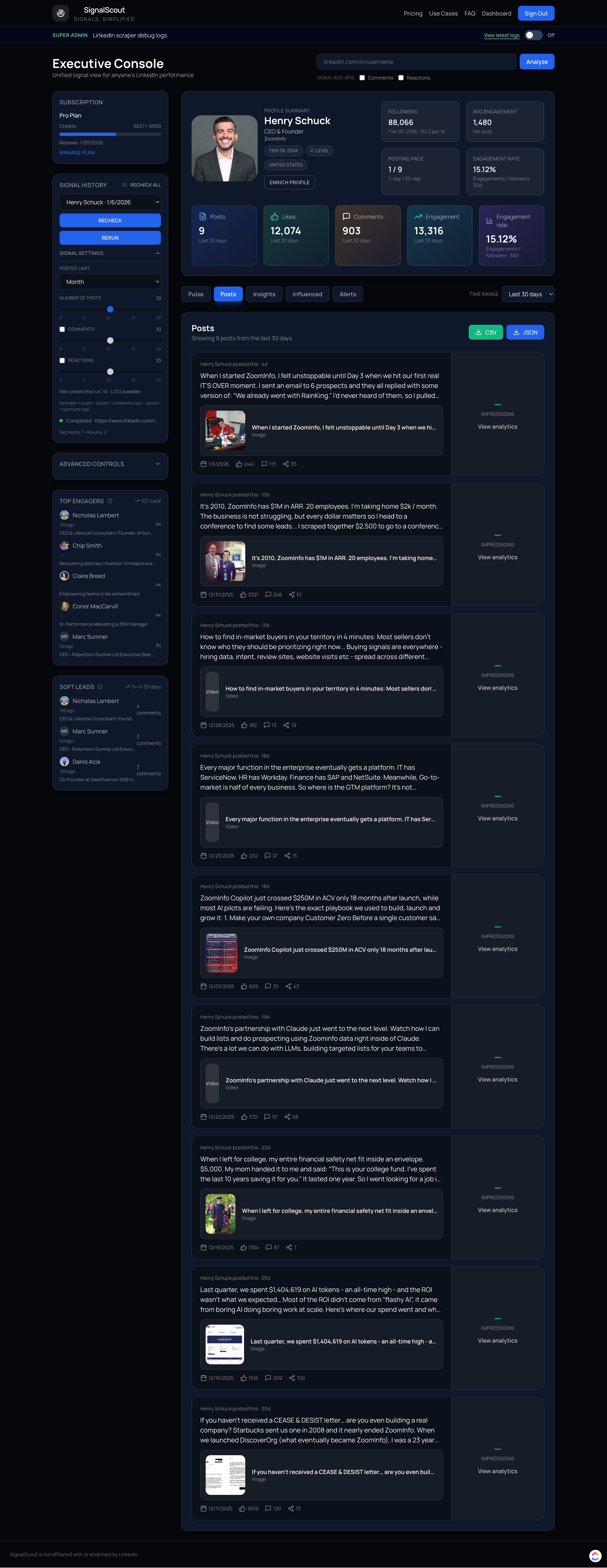
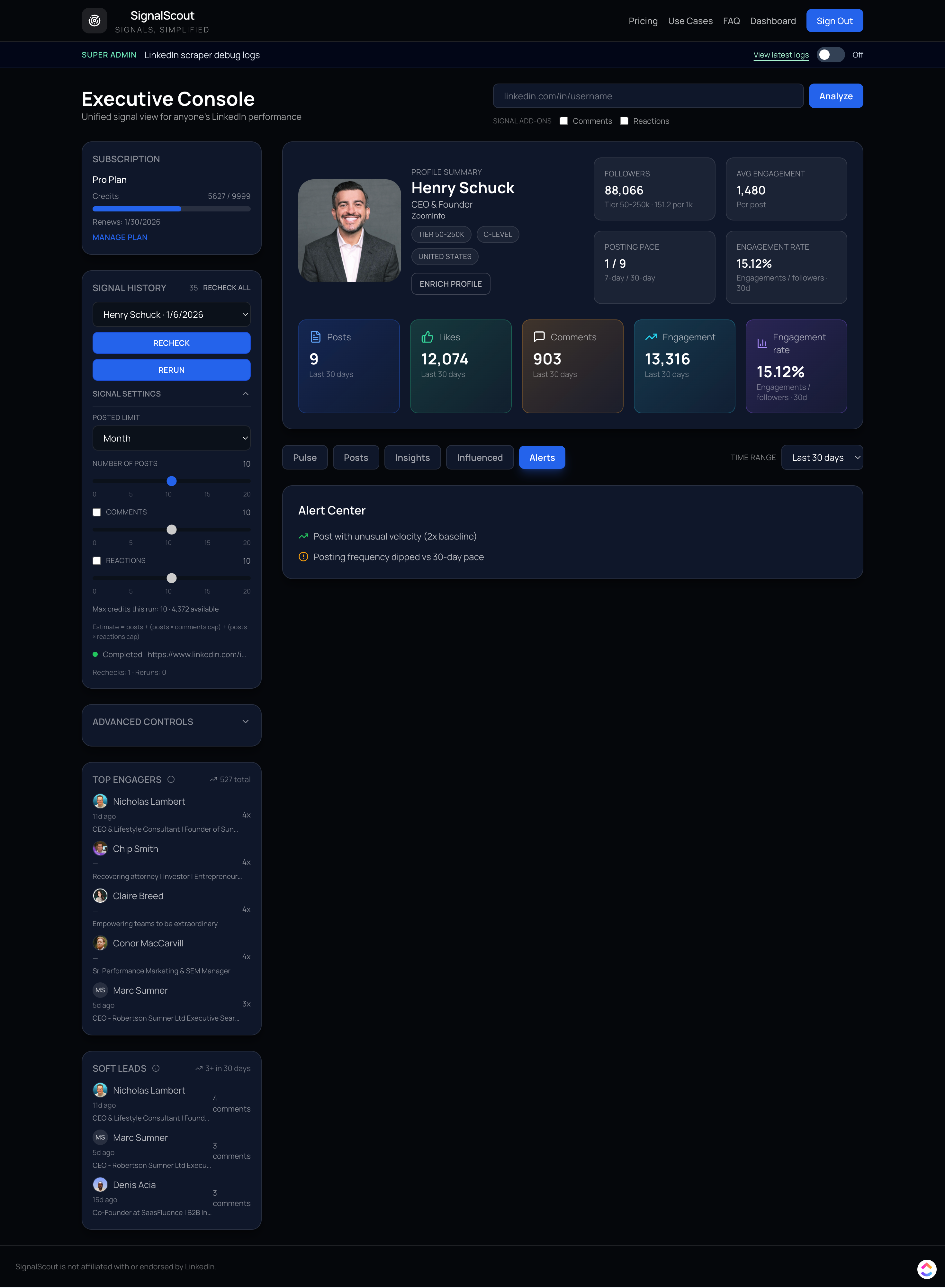
The dashboard frames SignalScout as a signal intelligence console, combining profile context, KPIs, and the tabbed workflow for deep analysis.
Single source of truth

Top Navigation
Global links, profile input, analyze action, add-on toggles, and account actions.
Sidebar
Subscription status, signal history, signal settings, credit estimator, advanced controls, top engagers, soft leads.
Profile Header
Identity, KPI summaries, posting pace (7d/30d), activity totals, and tab navigation.
Pulse Tab: Momentum and Performance
Pulse gives teams a fast read on momentum, separating short term velocity from baseline performance so they can see what is changing and why it matters.
Momentum tracker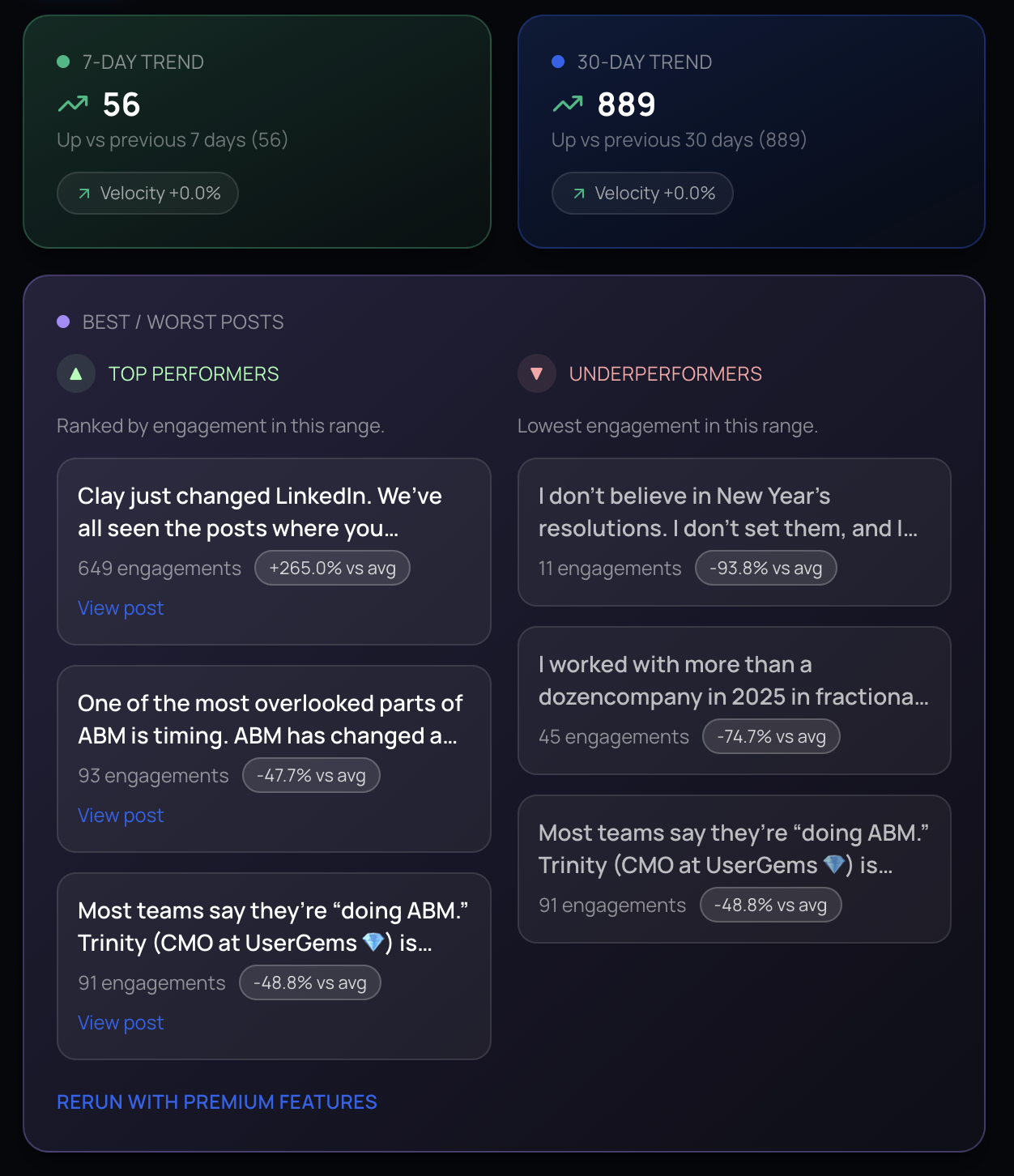
Why this tab matters
Pulse translates raw engagement into movement. It highlights short term changes in activity, isolates which posts are lifting or dragging performance, and shows whether momentum is accelerating or stalling across the current window.
For GTM teams, this is the difference between reacting to a single good post and understanding whether a profile is building consistent influence. For founders and operators, it provides a diagnostic view of whether recent output is reinforcing or weakening the narrative.
- Sales and CS use it to detect spikes or drops before they show up in pipeline.
- Marketing uses it to trace momentum back to specific posts and themes.
- Leadership uses it to validate whether engagement is compounding or fading.
Insights Tab: Competitive Intelligence
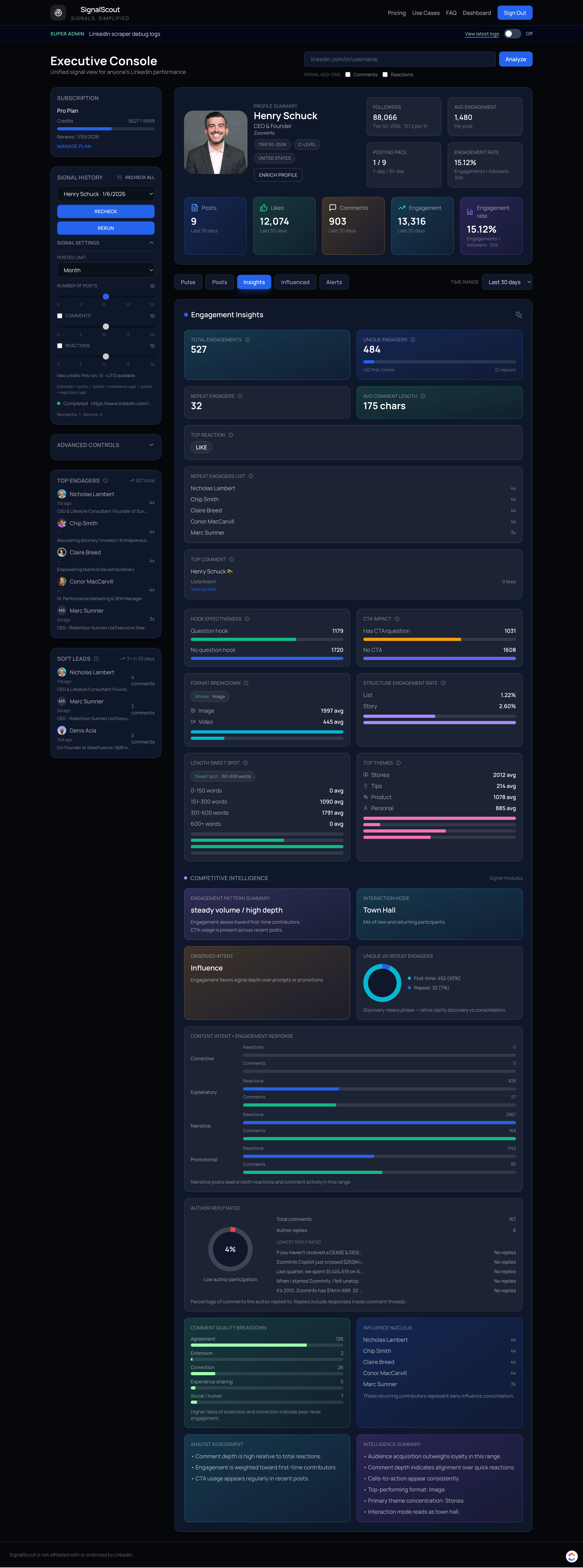
The insights layer converts engagement metrics into explainable signals so teams can understand why attention is forming and how influence concentrates.
Mechanism over metrics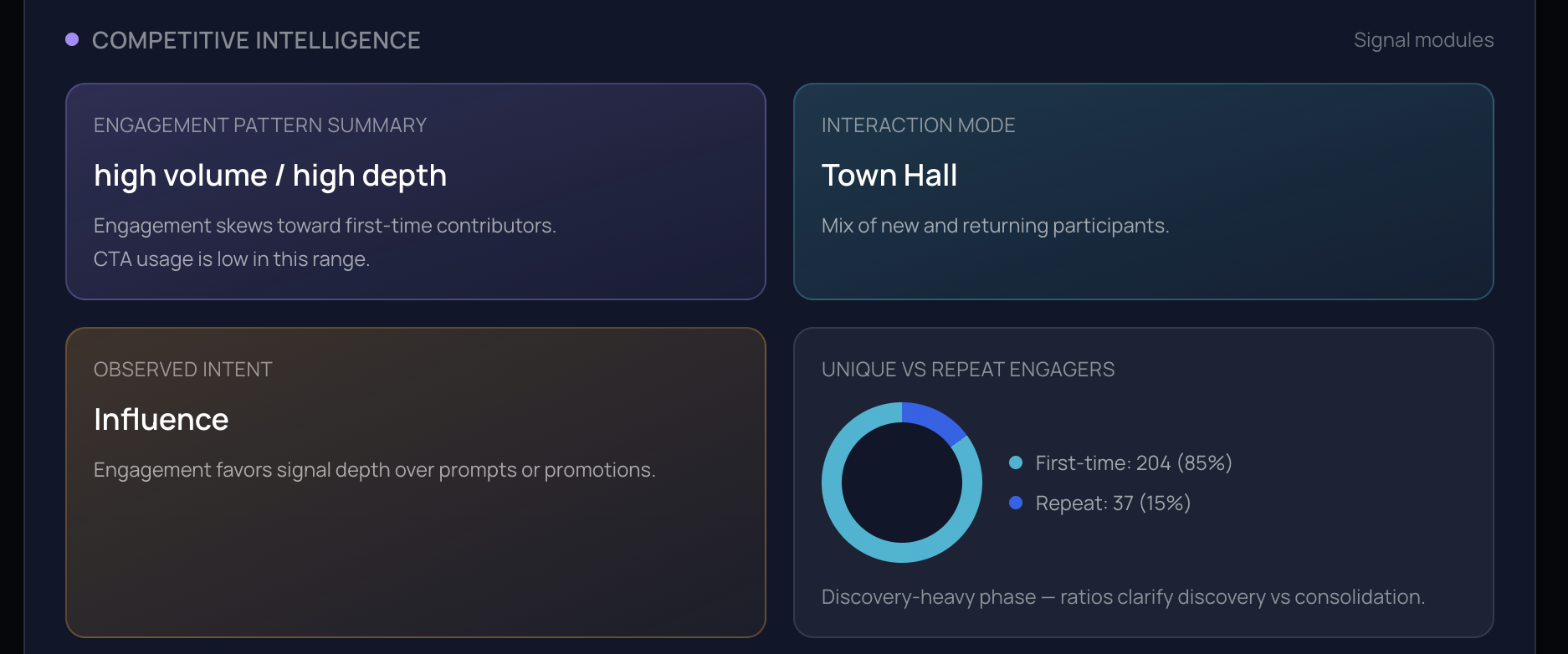
Component Library
A functional index of every major module, designed to help product marketing and enablement teams describe how each component supports decisions.
Module index
| Module | Purpose |
|---|---|
| Engagement core | Total, unique, and repeat engagement counts for the selected window. |
| Unique vs repeat ratio | Shows discovery vs consolidation with a ratio view. |
| Comment stats | Average comment length to estimate depth of engagement. |
| Top reaction | Most common reaction type in the window. |
| Repeat list | Top repeat engagers, indicating early influence formation. |
| Top comment | Most liked comment for qualitative context. |
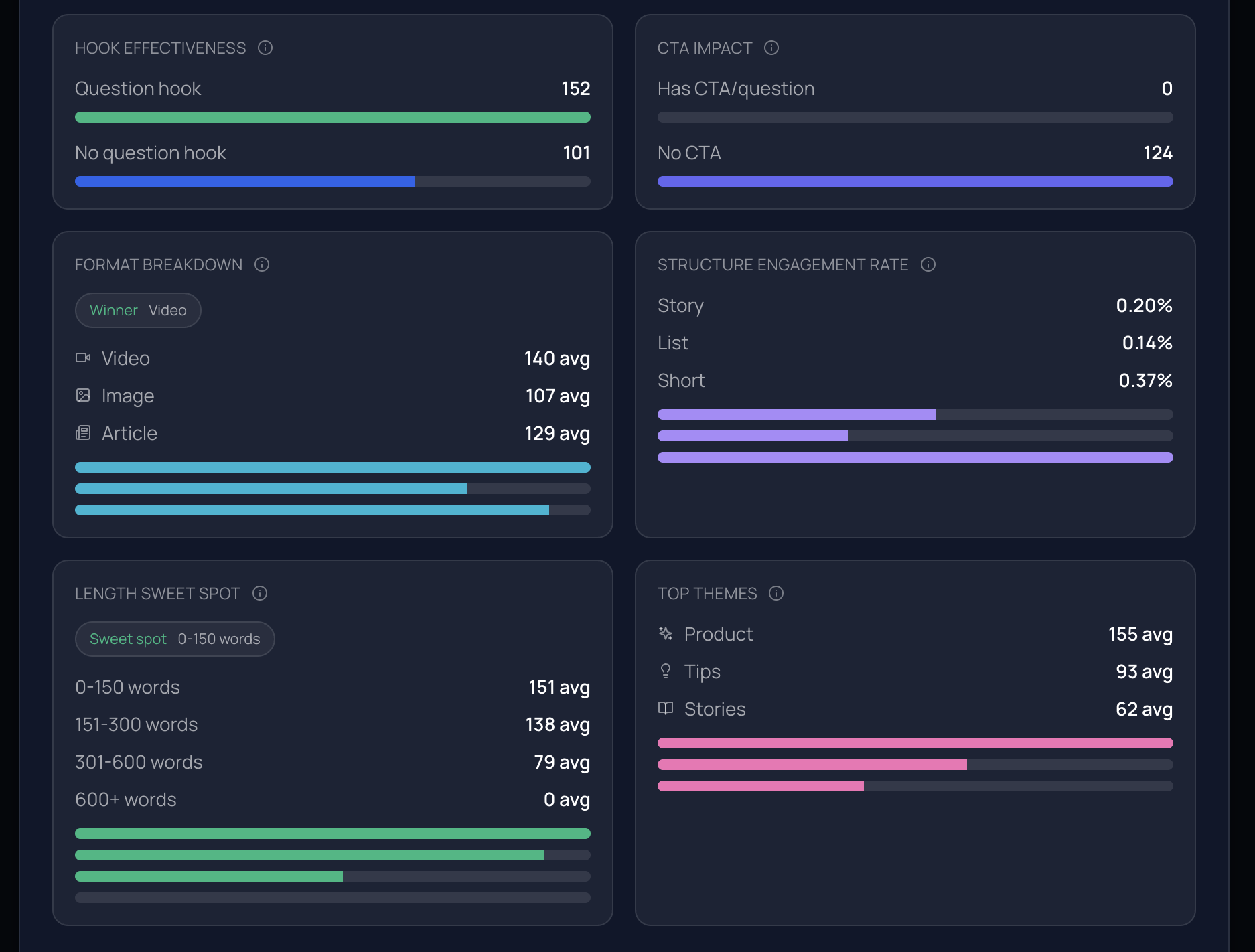
| Hook effectiveness | Compares posts with question hooks vs without. |
| CTA impact | Compares posts with CTA vs no CTA. |
| Format performance | Compares average engagement by content format. |
| Structure performance | Compares list, short, and story structures. |
| Length analysis | Shows engagement by word-count bucket. |
| Theme analysis | Distribution across themes: tips, stories, product, promos, personal, industry, other. |
| Behavior pattern summary | Summarizes volume, depth, repeat mix, and CTA presence. |
| Interaction mode | Classifies conversation type: roundtable, workshop, town hall, broadcast. |
| Observed intent | Interprets likely intent behind posting behavior. |
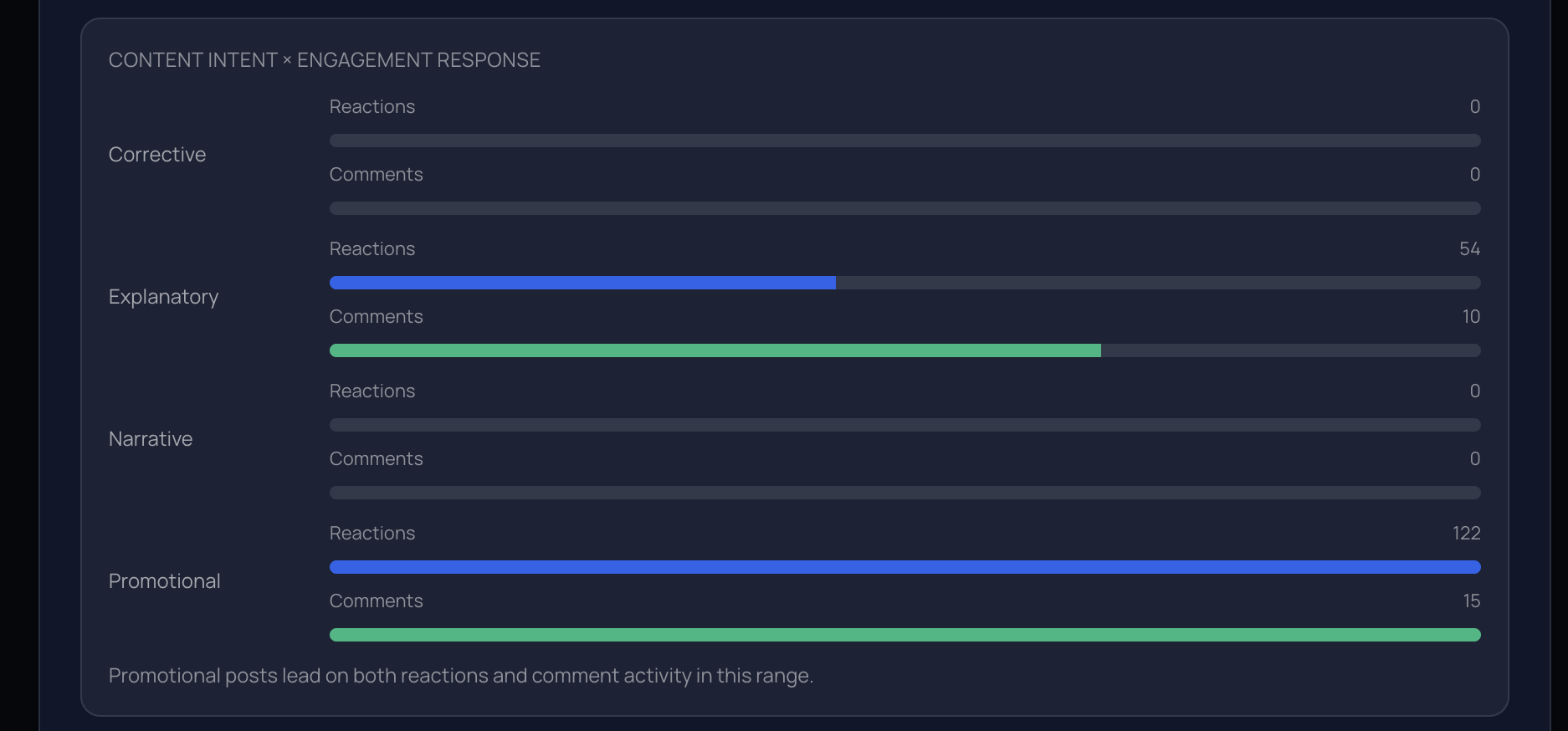
| Content intent x response | Compares reactions vs comments across corrective, explanatory, narrative, promotional intents. |
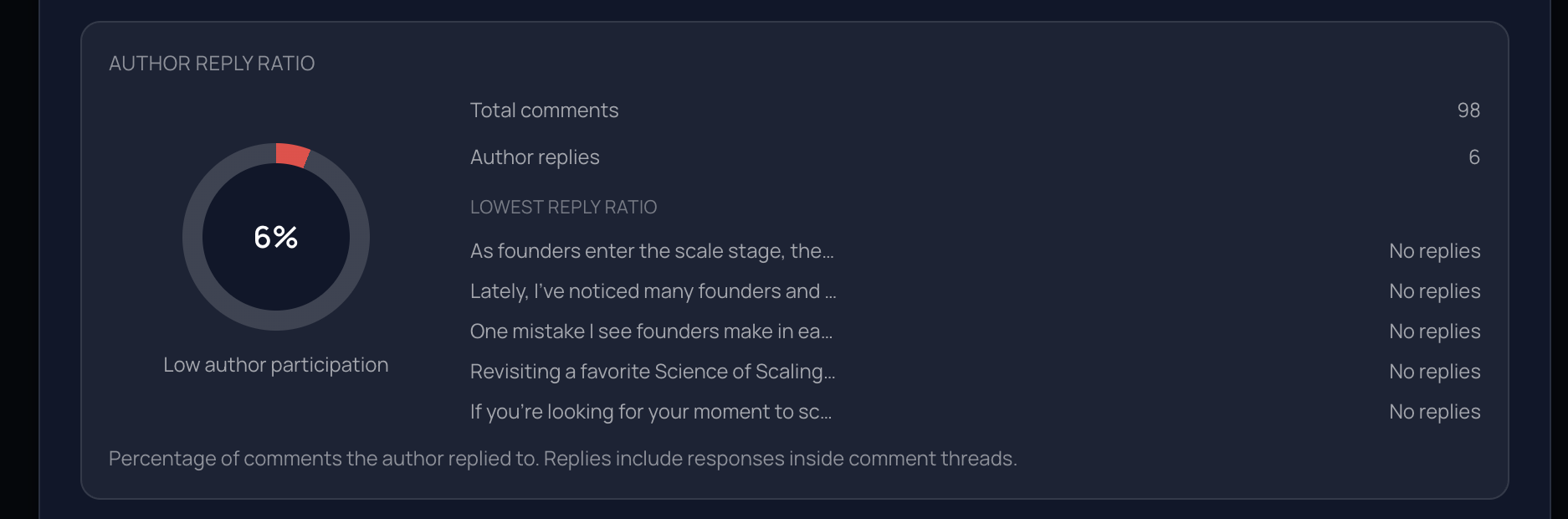
| Author reply ratio | Shows how often the author replies to comments in the window. |
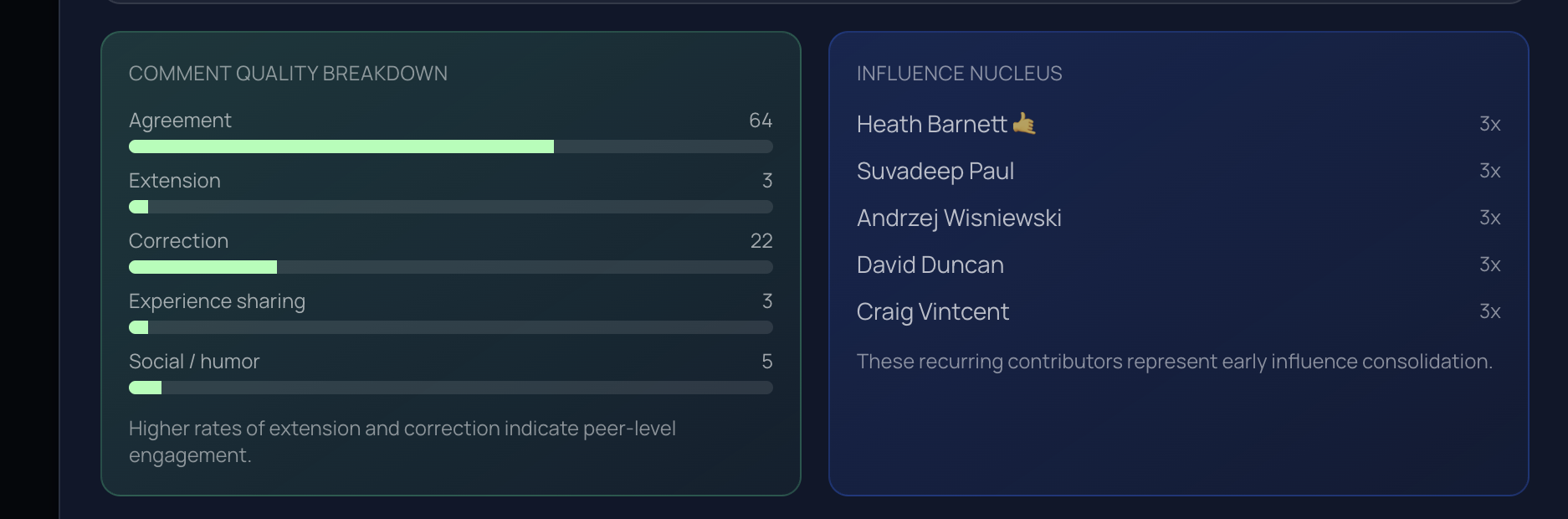
| Comment quality | Breakdown of agreement, extension, correction, experience, social. |
| Influence nucleus | Highlights repeat engagers who signal influence consolidation. |
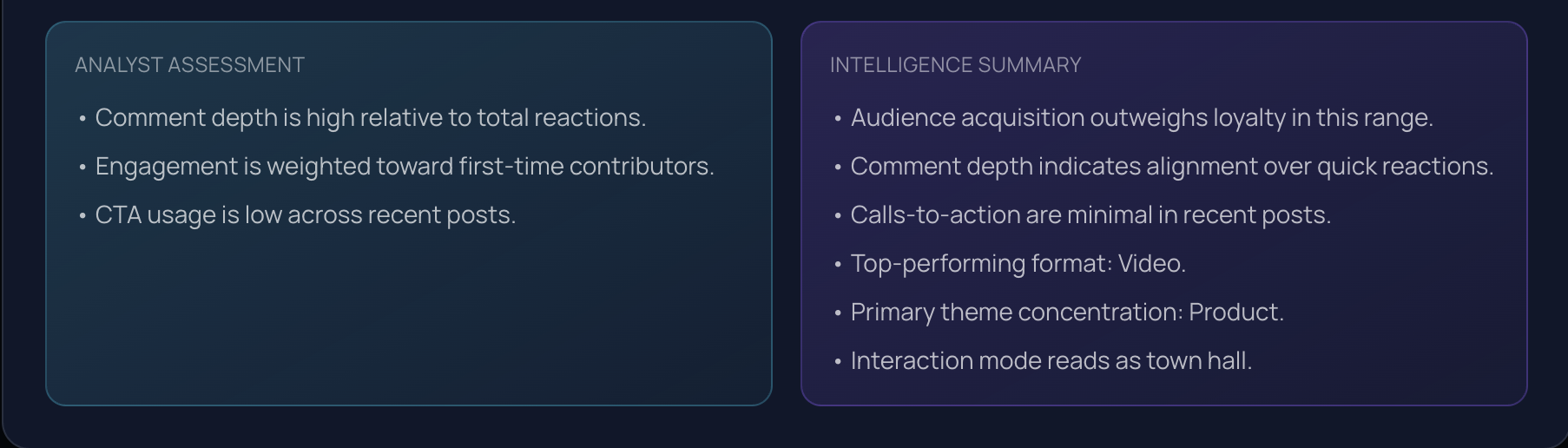
| Analyst assessment | Short interpretation notes for key dynamics. |
| Intelligence summary | High-level synthesis of what the signals imply. |
Turn public LinkedIn activity into intelligence
SignalScout translates engagement into clear, trustworthy signals so teams can make better decisions fast.